Today I am going to discuss a layer 2 security feature called port security. Port Security is used on switches to control and restrict access to a switch port based on the MAC address of the connected device. The restrictions can either be by only allowing a specific MAC address on a port, and/or only allowing a certain number of MAC addresses on a port. Port Security can be used to reduce the risk of attacks such as MAC flooding, ARP spoofing , or a rogue device gaining network access. Port Security has 3 types of violation modes which are shutdown the default mode, restrict, and protect. Each violation mode operates differently.
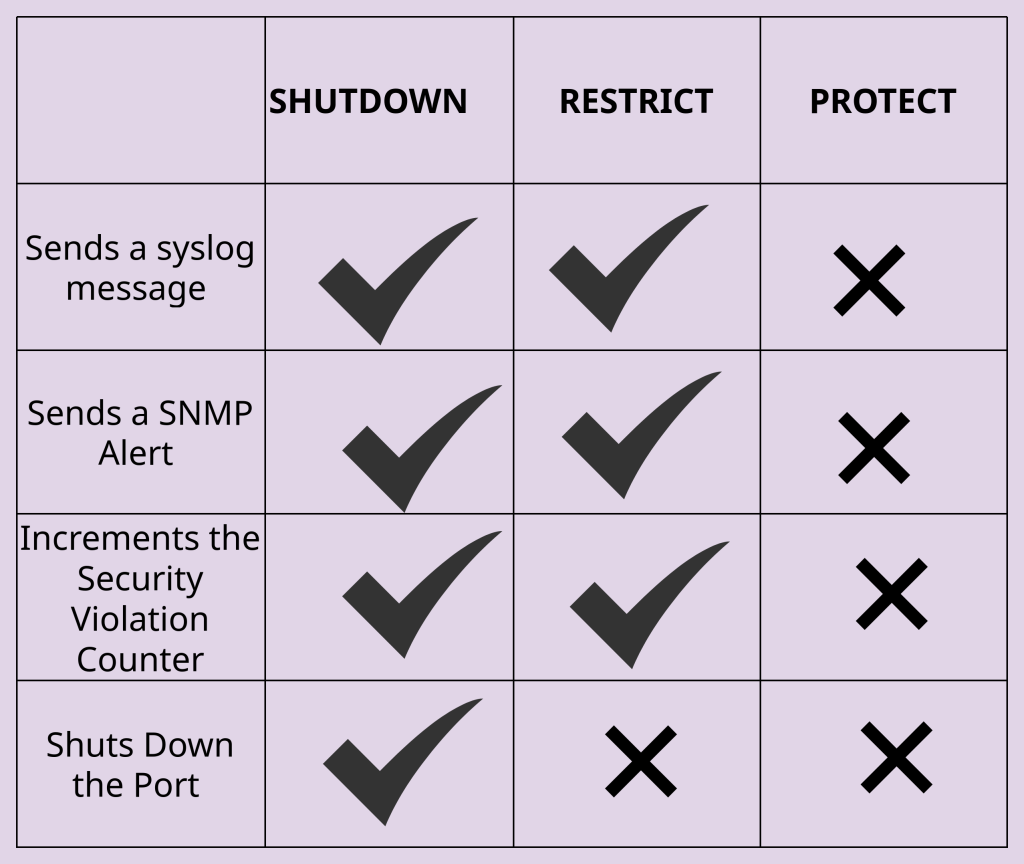
Shutdown- The first port security violation mode is “Shutdown.” This is the most restrictive violation mode, where the switch immediately disables the port if a security violation occurs such as an unknown MAC address being detected or the maximum allowed number of MAC addresses has been exceeded. When a port is operating in “shutdown” mode, when it is triggered, all traffic for all devices is blocked because the entire port is logically disabled. This is the default mode for port security, and this mode also sends a syslog message, an SNMP alert, and increments the security violation counter. A security violation counter is a statistic that keeps track of the total number of frames that were blocked because of port security.
Restrict- The next mode is “Restrict.” This mode can be characterized by providing network availability but also active enforcement. When a port’s violation mode is restrict, the switch is blocking traffic from unauthorized MAC addresses while the port remains up and operational for valid, learned MAC addresses. This mode also sends a syslog message, an SNMP alert, and increments the security violation counter.
Protect- The last mode is “Protect.” This mode is used when network availability is critical and network visibility is not needed. It is the least restrictive violation mode, where the switch silently drops offending frames from unauthorized MAC addresses while allowing the port to remain up. It will continue forwarding traffic for valid, learned MAC addresses and does not generate any syslog message, send any SNMP alert, and does not increment the port security violation counter.
It is important to note that port security will only work on ports that are manually configured as a static access port and for some platforms (like Cisco) a static trunk port. Port security will not work on any port where the DTP mode is “dynamic.”
MAC Address Learning- A switch has 3 ways of learning the MAC address of connected devices which are static, dynamic, or sticky secure. A static MAC address is manually configured by a IT staff member who uses the CLI to assign a MAC address to a device. Static MAC addresses remain in the CAM table until manually removed and are not subject to any aging timer within the MAC address table. The second way a MAC address can be learned is through “dynamic MAC learning.” This occurs when a device sends a frame across a network, and the switch automatically adds it to the CAM table. These MAC addresses are subject to a MAC address aging timer. A MAC address aging timer is a setting that determines how long a switch will keep a MAC address in its CAM table before removing it if no new frames are received.
When it comes to MAC address aging, there are two types of aging which are “absolute” the default, or “inactivity.”
In absolute aging, the MAC address is removed from the table after a fixed time period regardless of any activity. So if the fixed time period is 300 seconds, even if the device sends frames within those seconds the MAC address will still be removed and have to be learned again.
When the aging timer is set to “inactivity,” the MAC address is only removed from the table if no new frame is received from that device (with the same MAC) within the aging timer interval. So if the timer is 300 seconds and the switch receives a new frame within 60 seconds of learning it, the timer will reset and continue to reset when new frames arrive. But if no frames are seen by the switch within those 300 seconds, the MAC address will be removed.
The last method for a switch to learn a MAC address is “sticky secure MAC address.” This is a feature where a switch dynamically learns a MAC address and automatically adds it as a secure entry in the running configuration. A dynamic MAC address being learned is usually stored only temporarily, but a sticky MAC address has the potential to be permanently saved. Since it’s stored in the running configuration (RAM) since it was learned, it can be saved into the startup configuration (NVRAM) through one command (write memory). This will allow the MAC address to survive/persist across reboots like a manually configured MAC address. Sticky secure MAC addresses provide the convenience of dynamic MAC address learning with the persistence of static configuration.
Leave a Reply