Today I am going to be discussing wireless fundamentals including radio frequencies, channels and interference. We all are probably used to WiFi and bluetooth devices, but what is really happening under the hood? How is information getting traveling? Wireless, what we know of today as WiFI uses RF signals to transmit information. RF signals are a form of electromagnetic energy that is used to carry information wirelessly over the air, a vacuum (an environment with no air, think of space), or certain materials (glass, drywall, wood) without requiring a physical cable. An RF signal is essentially a radio wave that can carry information. Devices such as WiFi routers, cellular phones, radios, satellites, bluetooth devices, and WAPs (Wireless Access Points) use RF signals to transmit and receive data over varying distances.
Frequency Band- RF signals that are sent and received by an AP (Access Point) typically use a frequency band. A frequency band is a wide range of frequencies allocated for wireless communication. The most common bands are 2.4 GHz and the 5 GHz.
When there is an office, mall or any building in general with a large amount of space and traffic, multiple APs may be deployed. Although from an outsider perspective there is no problem with that, having multiple APs operating on the same frequency band with a lot of users can reduce performance because of interference. Interference is an unwanted RF energy from other WiFI networks or external devices, such as microwaves or bluetooth devices, that overlap with or degrade the quality of the desired WiFi signal. Having multiple APs within the same band is not ideal for performance because of channel interference, but the creation of channels has allowed multiple APs to use the same frequency band without having the reduced performance.
Channels- A wireless channel takes an already wireless frequency band which is a range of radio frequencies and divides it into a narrower range of frequencies. Channels allow multiple wireless devices and networks to communicate simultaneously while minimizing AP to AP interference by operating on different frequency ranges. For example, in a home, devices may use a single channel like channel 6 on the 2.4 GHz band because SOHO networks typically only have one AP and a limited number of users. However, in an office building or mall, multiple APs will use different channels such as channel 1, 6, and 11 to reduce interference while being able to handle many users at the same time.
Frequency (metric)- RF signals have two major metrics which are frequency and amplitude. Frequency is the complete number of cycles or oscillations an electromagnetic wave completes in one second. It is typically measured in hertz, where one hertz represents one cycle per second. So a higher frequency means that the wave is cycling up and down very quickly.
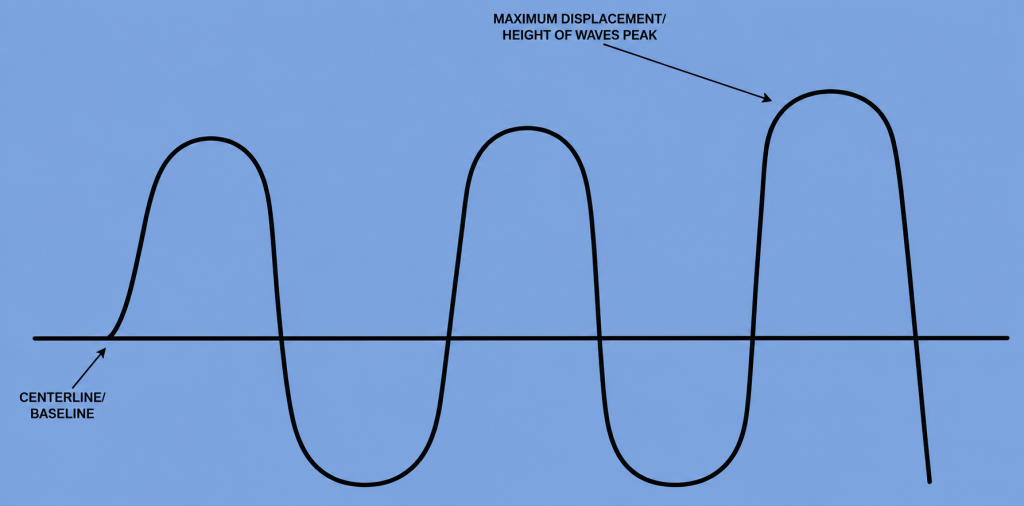
Amplitude- Another metric is amplitude, amplitude refers to the strength or intensity of an electromagnetic wave and represents the maximum displacement of the wave. A sine wave is a visual representation of an RF signal, and on a sine wave, amplitude is the height of the wave’s peak measured from the centerline. A greater amplitude generally indicates a stronger signal and more energy being carried by the wave.
Leave a Reply