Just like Ethernet transportation which supports an ethernet frame and IP transportation which supports IPv4/6 headers, wireless has its own header and frame format. An 802.11 Frame carries traffic from one wireless device to another device over the wireless network. An 802.11 frame is commonly referred to as a MAC (Media Access Control) frame. A MAC frame is the basic unit of data exchanged at the data link layer (layer 2), and can carry client traffic, management information, and control information depending on the frames type.
(PICTURE)

Frame Control – The 802.11 frame begins with a 2 byte (16 bits) field called the “Frame Control.” The frame control serves as an identifier that tells the receiving device what type of frame it is and how it should be interpreted. For example, if a frame is an association request, the AP will interpret the frame as a request from a client to join the network resulting in the AP sending back an association response. Same with a probe request, the AP interprets it as a client searching for available networks, and replies back with a probe response. The frame control field allows the receiver to have an idea of what to expect.
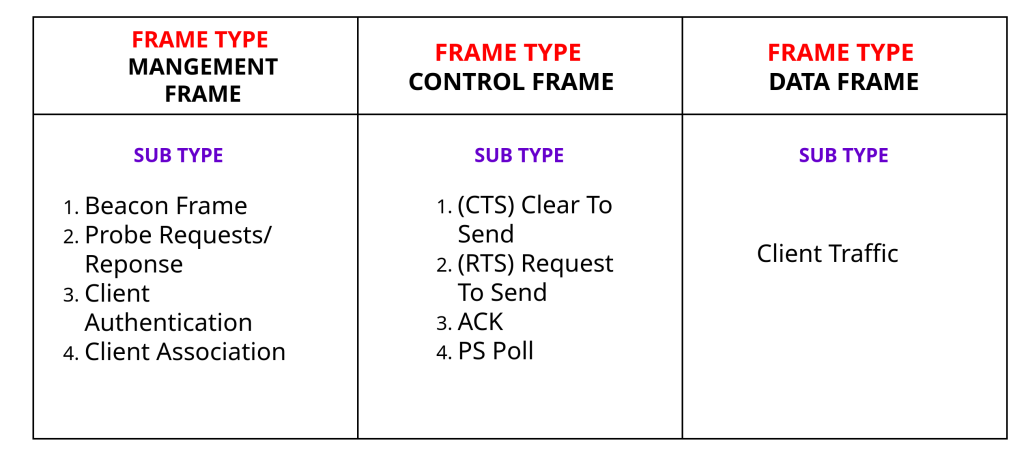
Frame control contains several subfields that define the frames type, purpose and operational characteristics. An example of an operational characteristic is the retry bit. A retry bit will allow the receiving device to know if the frame is a retransmission of a previously sent frame. The most important subfields in frame control though are the “Type” and “Subtype” bits. The type and subtype bits classify the frame as a management frame, control frame or a data frame. For example, if a frame is a beacon frame (subtype), the type would be classified as a management frame. Frame control also provides information about fragmentation, power management, encryption, and a lot more.
Duration/ID – The next field after frame control is the Duration/ID and takes up 2 bytes (16 bits.) The Duration and ID are split meaning, the frame includes one or the other. In most cases, the field contains a duration value, which specifies the amount of time in microseconds that the wireless medium (RF channel) will be reserved for the transmission of the current frame and any required acknowledgements or responses. Other wireless devices use the duration value to update their NAV (Network Allocation Vector, a timer that determines how long a device will remain quiet) and defer transmission until the expiration period has expired. In some cases however, the field may contain an association ID (AID) instead. An AID is used when a device is participating in power-saving communications with an AP. The frames exchanged during power-saving communication are Power Save-Poll frames. These are used when a device is in a “power saving state”, trying to conserve energy by operating in sleep mode most of the time but periodically checking for wireless traffic directed toward them.
Address- The 802.11 Frame can contain up to four address fields.
1) Receiver Address (RA) – The device that is receiving the frame over the wireless medium at the current hop. This is the immediate next receiver.
2) Transmitted Address (TA) – The device that is currently transmitting the frame over the air. This is the immediate past sender.
3) Destination Address (DA) – The final intended recipient of the MAC frame. The last host to receive the frame.
4) Source Address (SA) – The original sender of the MAC frame. The first host to send the frame.
Sequence Control – After the address fields, the next field is 2 bytes (16 bits) and is called “Sequence Control.” Sequence Control is a field of the MAC header used to help manage frame ordering and detect duplicate frames. This field shows 2 values at all times, the sequence number and fragment number. The sequence number identifies the original frame and is used by a receiver to ensure that the frame is processed in order and to detect missing or duplicate frames. The fragment number identifies the individual fragment when a frame is split into multiple smaller pieces for transmission. This allows the receiving device to reassemble the frame properly.
QOS Control – The next field is QOS Control, which is a 2 byte field in the MAC header. Similar to DSCP for IPv4/6 and PCP for 802.1Q tags, QOS control is used for traffic prioritization and to improve the performance of certain types of traffic. The method used in QOS control is TID (Traffic Identifier.) TID assigns a priority level to the frame, allowing time sensitive traffic such as voice and video to be forwarded before lower priority traffic such as file downloads.
HT Control – The next field is High Throughput Control for high throughput operations.
Frame Body – After HT Control, the actual payload data such as web traffic, emails, file downloads, voice traffic, and video streams are carried in this field for data frames. For certain frames like ACK frames the frame body is absent.
FCS – The last but not least field is the FCS (Frame Checking Sequence) field which functions very similar to FCS in the ethernet frame, using the same algorithm CRC (Cyclic Redundancy Check.) The FCS is a 4 byte field located at the end of the MAC frame that is used for error detection. It contains a CRC value calculated by the sender using the contents of the MAC frame. When the frame is received, the receiving device performs the same CRC calculation, and compares the result with the FCS value the sender calculated. If the values do not match, the frame is considered to have been corrupted in transmission and is immediately discarded. If the values do match, the frame is considered to be valid and is processed normally.
Leave a Reply