Today I am going to be discussing wireless security and talk about both legacy security protocols and newer more secure protocols. Ever since wireless has been used to provide network access, there have been many attempts to make it secure. A good security protocol will cover these three components which are:
- Confidentiality: Making sure that the payload data is encrypted and unreadable if intercepted or while being transmitted across the network.
- Integrity: Making sure that the packet has not been tampered or maliciously modified during transmission.
- Authentication: Verifying the identity of the user.
WEP – One of the first security protocols that was introduced for wireless security was WEP (Wired Equivalency Protocol.) This protocol was specified in the IEEE 802.11 standard and was designed to provide data confidentiality (encryption) similar to a wired network hence the name. WEP uses the RC4 stream cipher for encryption and relies on a static shared key (40 or 102 bit) that must be configured on both the AP and all client devices. A static shared key was just a manually configured secret password. This shared key was used to generate encryption keys which were used to encrypt the actual payload data.
In order to increase security, WEP added a 24 bit IV (Initialization Vector) to the encryption process. However, this wasn’t of much help because the IV was sent in plain text and 24 bits was not enough bits to create unique keys every time. Since 24 bits was relatively short, if the network is busy enough the same IV value would often be repeated. This is bad for security because when IV reuse occurs, an attacker can capture enough packets (IV is fully visible) and perform statistical analysis to recover the encryption key. On top of this, the whole network uses the same static shared key, making it a very easy protocol to crack and insecure in today’s standard which is why it has been replaced with WPA, WPA2, and WPA3.
Before I can discuss the other security protocols, the type of protocol depends on the use case. The type of security needed for a SOHO (Small Office Home Office) will be lackluster for a 20,000 employee organization, and the security needed for a corporate network is overkill for a SOHO network.
Personal – A SOHO network will be using the personal version of a protocol, one of the most common that I will talk about is WPA (WiFi Protected Access) Personal. WPA personal is a wireless security mode designed for a home or small office that use a PSK (Pre Shared Key) for authentication rather than using an 802.1X authentication framework along with an authentication (RADIUS) server. The only thing needed to access this SOHO network is to use the human readable password during authentication, the same password that is configured on the WAP or wireless router. No complicated process, if the password is “John123,” you just type “John123” when prompted and you now have access to the network.
Enterprise – Unfortunately using a shared password for a large company is not ideal and highly insecure. A large organization will typically be using WPA (WiFi Protected Access) Enterprise. WPA Enterprise is designed for organizations that require strong, scalable user authentication and centralized access control. In order to accomplish this, WPA Enterprise will follow the IEEE 802.1X authentication framework along with a centralized authentication server (RADIUS.) In this mode, each user is verified individually, meaning authorized users have access while unauthorized users cannot even connect to the network providing the granularity needed for strong security in large networks.
IEEE 802.1X – Well you’re probably wondering what 802.1X is now. IEEE 802.1X is a network access control standard that provides port-based authentication for wired and wireless enterprise networks. You will mainly find this framework in large organization networks to ensure that users and devices are authenticated before being granted access to the network.
IEEE Consists of 3 Components:
- Supplicant: The client requesting access to the networks
- The Authenticator: The switch, AP, or WLC that controls access to the network.
- The Authentication Server: The RADIUS server that validates the client’s credentials
When a client attempts to connect, the authenticator blocks all normal data traffic and permits only authentication traffic. The supplicant (client) and the authentication server (RADIUS) exchange authentication information using the EAP (Extensible Authentication Protocol), with the authenticator (AP) relaying the messages between them. If the authentication succeeds, the authenticator (AP) permits normal data traffic from the verified supplicant (client.) If the authentication fails, the supplicant (client) is denied access to the network. Since IEEE 802.1X verifies each user individually, the network will now have stronger access control.
EAP – In order for IEEE 802.1X to work, there needs to be protocols in place to exchange credentials. 802.1X is known for using the EAP (Extensible Authentication Protocol) to execute its authentication process. EAP is a flexible authentication framework that provides secure identity verification in network access technologies such as WiFi. It is important to note that EAP is not one authentication method, instead EAP defines a framework that supports multiple authentication methods which are known as “EAP Types.”
The EAP Types I will be discussing today are:
1) LEAP (Lightweight Extensible Authentication Protocol)
2) PEAP (Protected Extensible Authentication Protocol)
3) EAP-FAST (Extensible Authentication Protocol, Flexible Authentication via Secure Tunnel)
4) EAP – TLS (Extensible Authentication Protocol – Transport Layer Security)
In a WPA2/3 enterprise wireless network, EAP messages are exchanged between the supplicant and the authentication server, with the authenticator relaying the messages between them. In this process, each user is individually verified before network access is granted.
LEAP – LEAP is an 802.1X authentication method that provides user based authentication for wireless networks before stronger standards such as WPA2 existed. LEAP uses usernames and passwords to authenticate clients through an authentication server (RADIUS) and supports mutual authentication, meaning the server and the client both verify each other’s identity. Unlike other EAP methods such as EAP-TLS or PEAP, it does not use a TLS tunnel or digital certificates during the authentication process. Although LEAP was an improvement to the WEP protocol, it still used an outdated inner authentication method which was MS-CHAPv1. This was insecure because it is vulnerable to offline dictionary attacks when weak passwords are used.
PEAP – PEAP is an 802.1X authentication designed to securely transmit user credentials over wireless networks. It worlds by first establishing a secure (encrypted) TLS (Transport Layer Security) tunnel between the supplicant and the authentication server, with the server using a digital certificate for authentication. Once the secure tunnel is established, user authentication occurs within the encrypted tunnel using an inner authentication method such as MS-CHAPv2. The TLS tunnel protecting the credential exchange prevented eavesdropping and protected against credentials being intercepted.
EAP-FAST – EAP-FAST is a Cisco Proprietary 802.1X authentication protocol designed to provide secure wireless authentication without requiring digital certificates. Instead of using digital certificates to form a TLS tunnel, EAP-FAST uses a PAC which stands for “Protected Access Credential.” A PAC is a random cryptographic value that both the server and client possess to securely establish a TLS tunnel. Once the encrypted tunnel is created, user authentication occurs inside the encrypted tunnel using an inner authentication method, most likely MS-CHAPv2. The benefit of EAP-FAST is that it requires less administrative overhead compared to EAP-TLS, because it doesn’t need certificates to be installed on each device.
EAP-TLS – EAP-TLS is a certificate based 802.1X authentication method that provides a high level of security for enterprise wired and wireless networks. It uses the TLS (Transport Layer Security) protocol to establish a secure (encrypted) tunnel between the supplicant and the authentication server. Unlike PEAP, which typically requires only a server side certificate, EAP-TLS requires both the client and the authentication server to possess a valid digital certificate, providing mutual authentication. During the authentication process, each side verifies the other’s certificate before network access is granted. This completely eliminates the need to transmit usernames and passwords over the air. After a successful authentication, TLS creates a session encryption key to protect all data in future communication. Because this method relies on digital certificates rather than a password (such as LEAP), it is more resistant to password based attacks like offline dictionary attacks.
WPA
Now that we’ve discussed 802.1X methods I will be discussing WPA, WPA2 and WPA3.
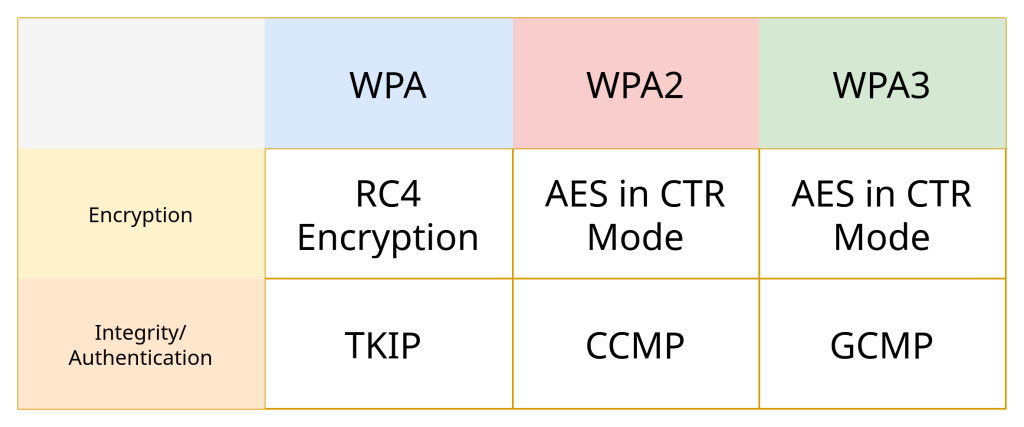
WPA – WPA (WiFi Protected Access) is a wireless security standard introduced as an improvement over the WEP protocol. It uses TKIP (Temporal Key Integrity Protocol) for key management. TKIP is a wireless security protocol developed to improve WEP without requiring clients to replace their hardware. Instead of replacing the insecure RC4 encryption algorithm, TKIP enhances it by introducing a new way to derive encryption keys with a method called “per-packet key mixing.” Instead of just a shared key with a 24 bit IV, TKIP combines the shared key along with a 48 bit IV and along with packet specific information (such as MAC address) to generate a more unique encryption key for each packet. To prevent IV reuse, it doubles the bit space from 24 bits to 48 bits. It also added a MIC (message integrity checks) to detect packet tampering. While this did improve security compared to WEP, the fact that it still relies on RC4 steam cipher still makes it an insecure protocol. WPA with TKIP was eventually replaced with CCMP used in WPA2.
WPA2 – WPA2 is a wireless security standard that replaced WPA and provides significantly stronger protection for wireless networks by using the IEEE 802.11i standard. WPA2 uses AES (Advanced Encryption Standard) with (Counter Mode with Cipher Block Chaining Message Authentication Code Protocol) to provide confidentiality, integrity, and authentication. CCMP uses AES with a 128 bit key to provide data confidentiality by encrypting the payload data. For integrity and authentication, CCMP uses CBC-MAC (Counter Mode with Cipher Block Chaining Message Authentication Code), which generates a cryptographic integrity value that allows the receiver to verify if the frame has been altered and that it originated from a trusted transmitting device. CCMP is a massive upgrade to TKIP and is mandatory for all WPA2 networks.
WPA3 – WPA3 is the latest wireless security standard designed to provide stronger security than WPA2. The encryption method used in WPA3 is GCMP (Galois Counter Mode Protocol instead of CCMP.
3 Major Security Improvements to WPA3 are:
- SAE (Simultaneous Authentication of Equals)
- PMF (Protected Management Frames)
- Forward Secrecy
SAE – SAE is a password based authentication method used in WPA3 personnel used to securely connect a client and an AP without exposing the actual password to attackers. SAE allows both the client and the AP to prove that they both know the correct password without ever transmitting the password or even a hash of it over the air. Instead of exchanging passwords, the client and AP perform a cryptographic handshake (also called the dragonfly key exchange) where both sides independently derive the same authentication value. The value that is exchanged is not the password itself, but a cryptographic “commitment” and “confirmation” values derived from the shared password.
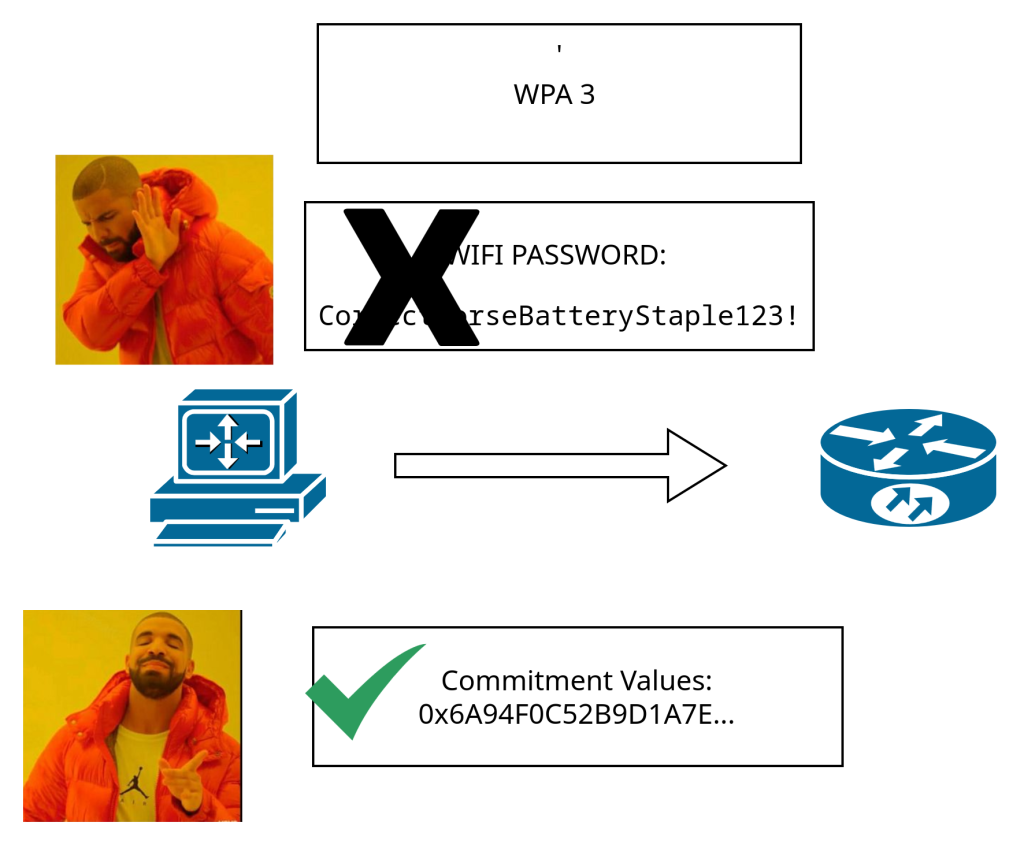
SAE improves its security compared to the past standard WPA2, because of its resistance to offline dictionary attacks. An attacker cannot just capture a packet and test passwords offline. Every client must go through this SAE handshake process in order to even know the password is correct. That means each password guess requires interaction with the network which makes attacks more difficult.
PMF – PMF, also known as the IEEE 802.11w standard, is a security feature used in WPA3 used to protect wireless management traffic from being spoofed, maliciously modified, and intercepted. In a traditional WiFi network (non WPA3), management frames such as deauthentication or dissociation frames are neither encrypted or authenticated, making them vulnerable to attacks such as deauthentication floods, where an attacker forcibly disconnects clients from an AP. PMF helps to prevent this by cryptographically protecting these management frames with encryption and integrity checks. This ensures that only legitimate APs and client devices are able to generate or accept management frames. In WPA3, PMF is mandatory.
Forward Secrecy – In WPA3, forward secrecy is a security feature provided by the SAE handshake that ensures that session encryption keys cannot be recovered even if the long term WiFi password is compromised in the future. Session encryption keys are temporary encryption keys used to protect the actual payload data during one communication session between a client and an AP. A session counts from when a client is fully associated to being fully disassociated.
In a WPA2 network that uses a PSK, an attacker who captures a 4 way handshake (used to connect a client and an AP) and later cracks the PSK, can then derive the session keys and decrypt past traffic. They were able to do this because the 4 way handshake contained enough information to be able to guess the session key.
In SAE, each authentication session creates a unique, temporary cryptographic key during the SAE handshake. Every connection between the client and an AP uses fresh (new) key material that is completely independent of previous sessions. That means if a client connects to an AP for a first session, but disassociates and connects again immediately after, both sessions will use completely different encryption keys. A session key is immediately discarded when the session ends and cannot be derived from the WiFi password alone. Because of this, even if an attacker learns the WiFI password, they cannot decrypt previously recorded traffic because the session keys are no longer recoverable.
GCMP – WPA3 switches up the protocol it uses for security as well, instead of using CCMP like WPA3 it uses GCMP (Galois Counter Mode Protocol.) GCMP is an AES based encryption, integrity, and authentication protocol used in WPA3 to provide faster and more efficient wireless security than CCMP. When it comes to GCMP, the encryption is fairly similar to CCMP, meaning it uses AES with a 128 bit or 256 bit key in CTR (Counter) mode to provide confidentiality. GCMP however uses GMAC (Galois Message Authentication Code) for integrity and authentication.
GMAC differs from CBC-MAC because of parallel processing. Both CCMP and GCMP process the data payload in 16 byte AES blocks. CBC-MAC however requires sequential processing, authentication and integrity checks must be done in a strict order, one block depends on the previous. With GMAC however each block can be processed independently and simultaneously using different CPU cores or hardware execution units. This means one core may process blocks 1 and 2, while another core processes 3 and 4 at the same exact time. As a result, this makes GCMP faster and more efficient than CCMP.
Leave a Reply