If you’re studying for network+, CCNA, or just anything networking you are going to encounter the word encapsulation and decapsulation A LOT. Encapsulation and decapsulation is the heart of how computers are even able to talk to each other. You most definitely would not be viewing this right now if bits never turn into signals and signals back into bits. Let’s dive into it!
Encapsulation is a process used by layer 4 to layer 2, so that the layers below it and the layers on another host machine can interpret and process data. Without encapsulation frames would never get sent to the right MAC address, IP packets would never get to the right destination IP, applications would never go into the right port consistently. So what is it? Encapsulation is the process where each layer takes data and adds their own control information in the form of headers and trailers specific to that specific layer so it can be understood and processed by other layers on both the same device and the receiving device. PDUs are what the data is called after it has been encapsulated and ready to be transmitted. PDUs are different for every layer and are very important for understanding any kind of networking topic so here is the list.
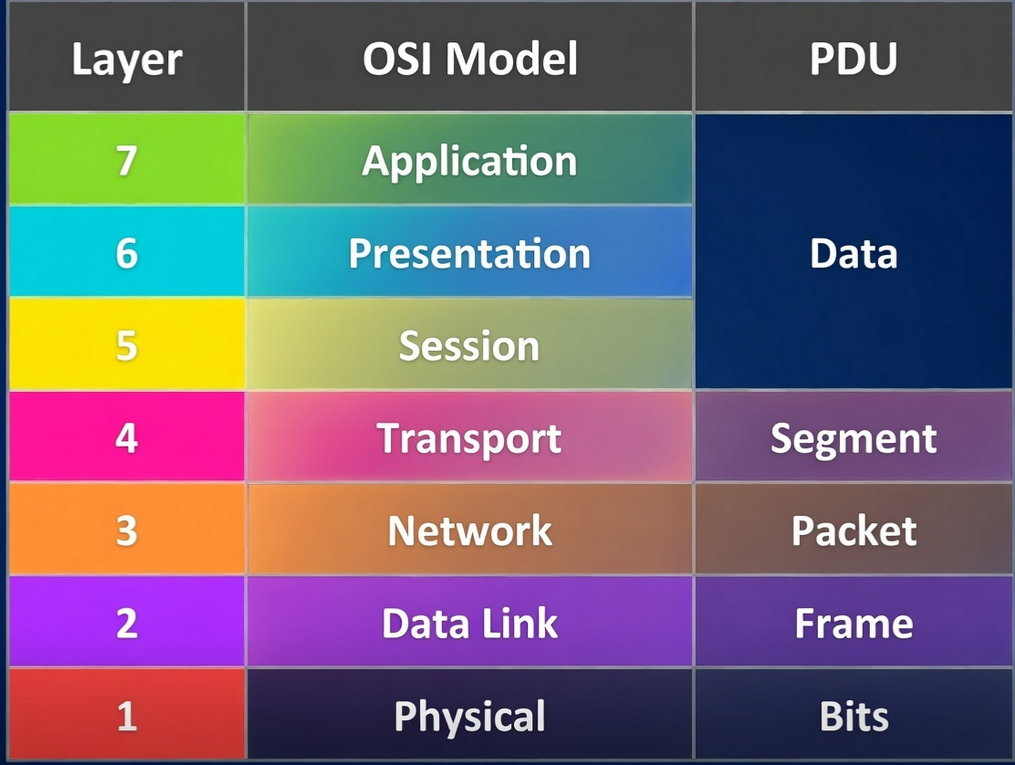
Whenever you hear, a frame is being transmitted across the network, you know that it is for layer 2. If you hear a packet has traversed the network, you know that it is layer 3. The control information being added is valuable information, and data gets encapsulated starting from layer 7 and goes down one until it reaches layer 1. Lets break down what kind of control information is being added starting from Layer 4. The transport layer is responsible for applications arriving on the port it’s supposed to be in. The transport layer adds protocol-specific headers such as TCP or UDP, including source and destination ports. So if it came from telnet, then the port is TCP port 23, or DHCP is UDP port 67 or 68. The information is then handed to the network layer. The control information in a layer 3 header has vital information such as version(IPv4 or IPv6), total length (size of the header and the payload), source IP, destination IP, and more. As you can see this is CRITICAL information being added, the router will have absolutely no idea where to forward a packet without a destination IP. This packet then goes onto the data link layer. At this layer, the control information added is in the form of not just a header but also a trailer. It includes source MAC, destination MAC, and FCS in the trailer. As you can see here even though there’s a destination IP, the IP packet cannot be transmitted on the local link without being encapsulated with a destination MAC address. When it arrives at the physical layer, control information is not really added here but encoding and decoding happens here which is crucial. Before the physical layer can transmit the signal through the link it’s stuck with bits? If you’ve read past blogs, cables don’t transmit bits, they transmit signals whether electrical or pulses of light. So the physical layer’s job here is to turn those bits into signals to another host.
When the receiving host gets it, the process is something called decapsulation. This is reading and interpreting what the other layers on the sending device put, taking the appropriate action with that information, removing any headers and passing it up the protocol stack. It is essentially the opposite instead of it going from layer 7 to layer 1, goes from layer 1 to layer 7 and the data will arrive unaltered ready to be used. When it gets the layer 1, the physical layer turns the signals back into bits. When it gets to layer 2, it reads the header, sees the destination MAC, checks the FCS to make sure it is not corrupt and is on its way. At the network layer, the destination IP address is checked, and sees that the packet belongs to them and goes up to transport. At the transport the protocol is checked, and sees the port number and forwards it to the correct port where it should be expected. And it keeps going up the protocol stack until it is fully ready for use at the application layer.
Same-Layer vs Adjacent-Layer Interaction
In the OSI layer, each layer is doing a service either to the layer above it in the protocol stack or the same layer on the other device’s protocol stack. When a layer is providing a service the layer above it, such as the data link providing a service to the network layer on the same device is called adjacent-layer interaction. What does it mean for a layer to provide a service to the one above it though? Say layer 3 wants to send a packet to another subnet, well how will it get to that subnet? It needs to go to the default router, and what information is needed to get to the default router, a MAC address. Layer 3 doesn’t deal with MAC addresses? The layers below it provide a service that the network layer can’t do. Layer 2 handles the framing, and error detection. But what’s needed for the frame to travel a link? It needs encoding, well who does that encoding? The physical layer handles that, the physical layer then provides a service for the data link layer by taking care of turning the bits into the correct signal via encoding.
Not only do layers communicate on the same device but they communicate to other protocol stacks on the device that is receiving the encapsulated data. So the physical layer can speak to the receiving physical layer. The data link layer can speak to the receiving data link layer, this is called “same-layer interaction.” These layers are communicating because of the control information that is added in the header and trailers. An example of a same-layer interaction is switch1 talking to switch2 and switch2 looks at the FCS from switch1 and verifies that the ethernet frame is not corrupt. Another example is a router putting source and destination IP and sends the packet to router2. Router2 will read the destination IP and make a forwarding decision based on the control information in that header. This is how same-layer interaction allows for different devices to communicate.
Leave a Reply