Today we are going to talk about connected and local routes. Routes are instructions/rules on a routing table that tells the router where to forward data. A router relies on routes on the routing table to know how to forward a packet. A routing table is populated with routes that tell the router the destination networks, subnet masks of those networks, next hop address toward that network, or an outgoing interface that directs packet toward that network. Without routes, routers would be clueless on where to direct IP packets. Think of it like a GPS, it gives you instructions street by street, telling you to turn left on one street or right on another. A route tells the router to reach this destination forward the packet out of this interface, or send it to this IP next.
On a routing table you have probably seen some routes labeled with C and L. If you haven’t I have put a picture below this for you.
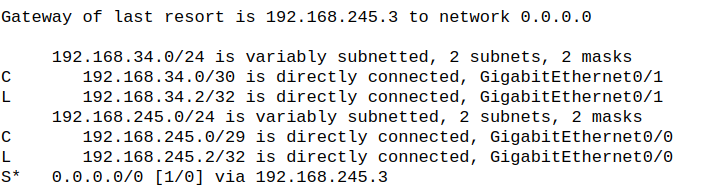
C stands for connected route and L stands for local route. On a router every interface has its own unique IP and MAC address, so two ports on a router can be in two different subnets. Since the subnet belongs to an interface that means the router should know how to reach it, this is where connected and local routes come into play. Connected routes are the specific network that an interface belongs to. Connected routes only show up on the routing table when these requirements are met:
- The interface is up/up (administratively up/ operationally up)
- The interface has been assigned an IP address.
Once the interface has an IP and is up, the connected route is then put onto the table, allowing that network to be reachable via that port. Keep in mind this is the network address of the port so if the port is assigned the IP of 192.168.1.1/24, then the connected route on the routing table would be 192.168.1.0. If the IP were 192.168.2.2/24 then the connected route would be 192.168.2.0.
A local route is a route on the routing table that is the actual IP address of the router interface. This IP is the literal identifier for that port, and since its the actual owner of that IP address it will always have a host prefix of either /32 for IPv4 or /128 for IPv6. The same rules apply to local routes for it to appear on the routing table:
- The interface must be up/up
- The interface must be assigned an IP address
Connected routes represent networks and local routes represent host routes for the router interface itself. Local routes are not meant to forward any traffic but to receive traffic meant for that IP address.
Leave a Reply