Hi, today I am going to be talking about DTP (Dynamic Trunking Protocol) and VTP (VLAN Trunking Protocol). These are features that are not really used in modern networks because of security reasons but they are a part of the CCNA exam which I am currently studying for so why not.
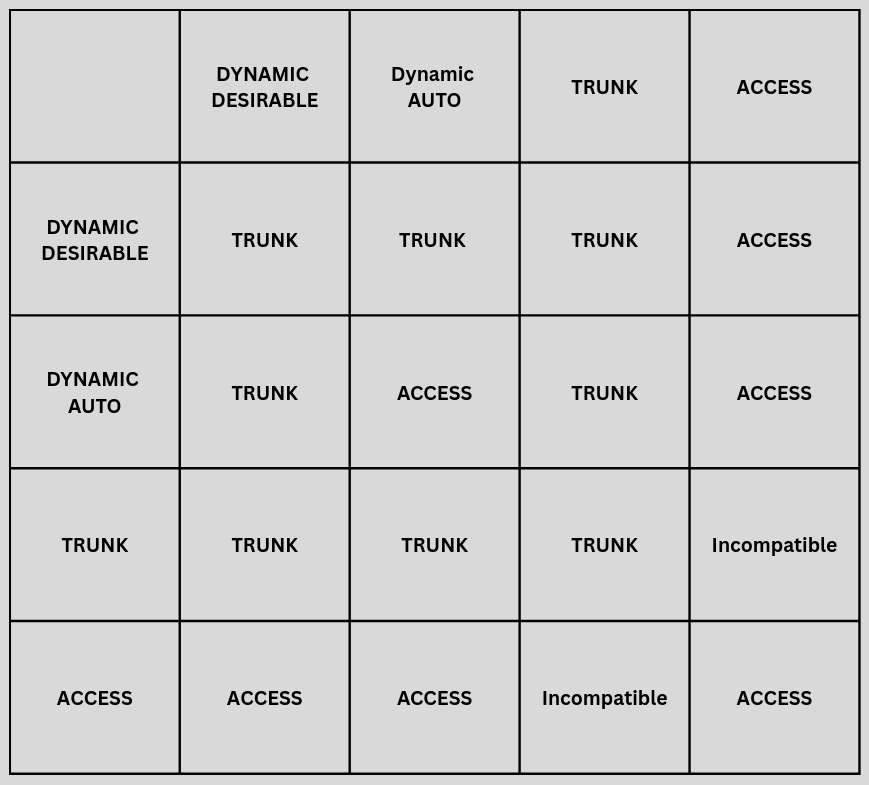
DTP is a protocol that is used to negotiate trunking between two switches. This protocol when enabled on both switches decides whether the interfaces that are linking them together should operate as an access port or trunk port. A switch port can be configured in different modes such as dynamic desirable or dynamic auto. They can also be deliberately configured as an access port or trunk port statically. Dynamic desirable means that the switch port will actively try to form a trunk link with the switch port on the other switch. Dynamic auto means that it will passively wait for the neighbor to initiate a trunk link (By default, Cisco switch ports are dynamic auto). It will only form a trunk if the other switch port initiates, if it doesn’t initiate a trunk will not form. If access is on one switch port , and the other side is dynamic auto or desirable, both ports will operate as access ports. This happens because when a switch port mode is in access mode, it will not send any DTP advertisements. When access is on one side, even if dynamic auto tries to initiate access mode will stay in access mode causing dynamic auto to fall back to access mode. Same thing happens with dynamic auto, after a while of not getting any DTP advertisements it will fall back to access mode. If a set up has one side trunk and the other side access, any VLAN tagged traffic toward the access port will automatically get dropped because they don’t process VLAN tagged traffic. On the contrary any switch port mode connected with the switch port mode trunk (except for access) will form a trunk link. Trunk mode with dynamic desirable? Trunk link approved. Trunk mode with dynamic auto? Trunk link approved. Trunk mode with another trunk mode? Trunk link approved. By now you should see a pattern, but to make it simpler and more understandable I have put a chart below for you to know whether a trunk link will form or not.
VTP
Let’s talk about VTP now. VTP is a protocol that helps synchronize and edit a VLAN database from one switch to another. Depending on the VTP configuration, any edits to a VLAN database on one switch can propagate to all other switches in the domain. This was an easy way to update VLAN configurations that remained the same on most switches. VTP comes in 3 modes, which are client, transparent, and server. In order for VLANs to actually propagate from one switch to another they have to be on the same VTP domain.
VTP server is the main switch where all the VLAN configurations are made, you can create, edit, and delete VLANs as you wish. These changes are then propagated to the entire VTP domain, and VTP clients adapt all of those changes. Say you delete VLAN 100 on switch1 which is a VTP server. Switch 2, which is a VTP client, will receive an advertisement from the VTP server with a higher configuration revision number and update it, essentially deleting VLAN 100. What is the configuration revision number though? Config revision number is a counter that increments any time a change has been made to a VLAN database. Since VTP servers are the only mode that can edit the shared VLAN database, a higher revision number takes precedence over any switch that participates in the VLAN domain. This was a wise idea at first, but what if there’s an old switch or a backup switch that needs to go online and its revision number somehow is higher? This would lead to all switches in the VTP domain adopting that database, including VTP servers making VTP a liability.
VTP client is a mode where there is no creating, editing or deleting any VLANs. The job of this switch in the VTP hierarchy is to listen for VTP advertisements from VTP servers with the highest configuration revision number in the same VTP domain and forward VTP advertisements. They cannot make any changes locally unless the switches VTP mode changes to transparent or server.
VTP transparent is a mode where the VLAN database can actually be changed locally. VLANs can be created, edited, and deleted all locally on the switch. Its role within the VTP domain is to forward VTP advertisements and that’s basically it. When it receives VTP advertisements it will not update its database with it, but will only send it out of its trunk links. It will not also send advertisements for its own database. It just forwards the advertisements and minds its business. It’s important to note that VTP will only advertise on trunk links.
Leave a Reply