Today I am going to discuss multiplexing and demultiplexing. These are crucial mechanisms operating at layer 4 that allows computer users to use multiple applications at the same time. A typical user working in a corporate environment is most likely using email, the web browser, VoIP (Voice over IP), SSH, FTP, DNS and so much more. I mean I’ll admit it, I am never browsing the web with only one tab open lol. So how does the receiving host know where to forward the data? Through multiplexing and demultiplexing!
Sockets- Multiplexing allows a host to run multiple concurrent applications at the same time while sharing the same network medium (cable) and IP address. Even though they share the same resources, multiplexing and demultiplexing allows each session to be completely unique so that each session is completely separate from another session. How this is done is through socket pairs and port numbers. Whenever an application session is initiated by a user on a computer, a socket is created. The server on the other end also has a socket and when a connection has been established a socket pair forms. In TCP, this is after the final ACK of the “3 way handshake.”
5 Tuple- A socket pair contains information called a “5 tuple,” and this 5 tuple will help both endpoints of the communication identify the current application session. When a socket is opened on one end of the application session, the other end will open a socket as well. So say PC1 goes on a website hosted by a web server. PC1 will open a socket and the web server will open a socket as well. A socket pair is uniquely identified by what’s called a “5 tuple.” In a 5 tuple, you will find the source and destination IP address, the source and destination port numbers and the protocol being used either TCP or UDP.
Port Categories- Before I can dive into how the port numbers identify unique sessions, I will briefly explain the categories of port numbers defined by the IANA (Internet Assigned Numbers Authority). At first we have Well Known port numbers which range from 0 to 1023, these port numbers will be used for any application such as DNS, SMTP, POP3, SNMP, FTP, DHCP and so much more. These numbers are used to uniquely identify the application protocol, so when the destination is port 53 the receiving device will know that the packet belongs to the DNS application service. The next category of ports are numbers 1024 – 49151 which are called “Registered Ports.” Registered ports are used for vendor-specific applications. For example, Microsoft uses registered ports such as Microsoft SQL Server (port 1433), and RDP (port 3389). The last but not least is “Ephemeral (Dynamic) Ports.” Ephemeral ports are unique ports that are assigned to users when a session is opened. Whenever you open an application, that session will be assigned a source port of any range from 49152 to 65535.
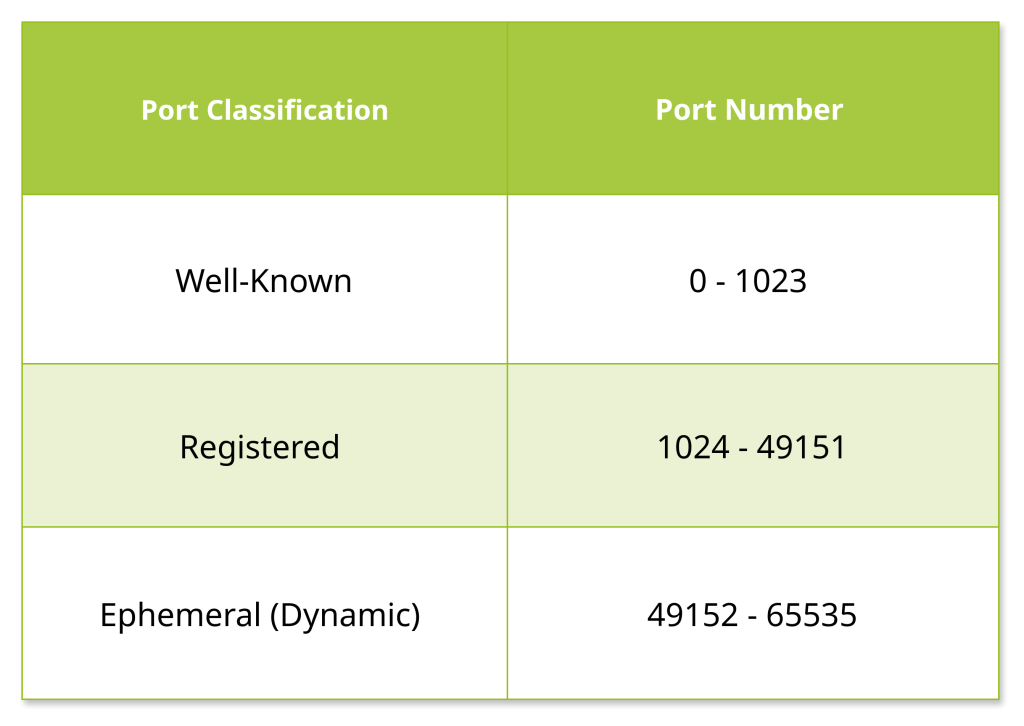
Socket Pairs- Now that I’ve discussed what each category of ports are for, I will go back to socket pairs. When a connection is established a socket pair opens with unique identifiers which are port numbers. For example I will use HTTPS which is port 443 (Well-Known port). When a client initiates a session with HTTPS, the source port will be a completely unique source port from the ephemeral range. So for example if I open 3 tabs and go on three different HTTPS websites, I will have opened 3 sockets that will become apart of a separate socket pair each with completely different source ports.
1st session = 60,000
2nd session = 62,000
3rd session = 63,250
These source ports will be vital, so when return traffic comes back to the PC that I am on it will only be delivered to the current session for that application. Once the session is over the source port number will be closed and can be reused again. The multiplexing part of this is that it takes all of these sessions and gets encapsulated down the protocol stack to travel the same physical wire that the PC is connected to. Even though they are completely different sessions and will arrive at different destinations, the physical hardware and cables up to the default gateway will be the same.
Demultiplexing- Now comes demultiplexing, where the receiving device receives a packet and forwards it to the right destination. A server for example can be running many different services such as a web server, DNS, DHCP, SNMP and much more. So how does it know which socket to forward it to? When a segment is arrived it will look at the destination port and know which application it’s going to forward it to, so DNS is 53, DHCP is 67 and so on. With TCP it doesn’t just stop there, it looks at all the information in the header (source and destination IP, source and destination port, protocol) and with this information it delivers the data to the correct socket for that session. This happens on both ends, as data will be coming back and forth between the socket pair.
Leave a Reply