Today I am going to talk about the different types of IPv6 addresses used. Although IPv6 is just supposed to be another IP protocol with sufficient addresses, the design of IPv6 is very different when it comes to addresses. The types of addresses I will get into today are ULA (Unique Local Addresses), GUA (Global Unicast Address), and LLA (Link Local Address.) Each one of these addresses are used for different reasons and purposes and is vital to understanding IPv6.
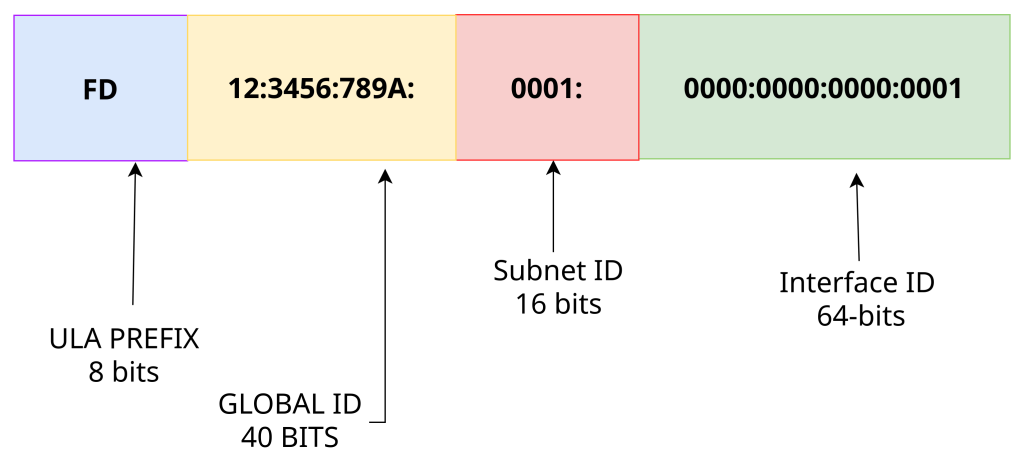
ULA- ULA is a private only address, meaning that this address can only be used in a private network. Functioning just like the IPv4 private address except these are never translated because NAT is not common practice in IPv6. The global ID for this address is 40 bits instead of the more common 48 bits because every ULA address needs to start with two hexadecimals which are FD::/8, which also falls under the larger FC00::/7. Whenever you see an address that starts with FD, you will know for certain its a private address. This address’s scope is not limited within the companies or organization’s border router(routers with one interface internal and another external) meaning it can traverse routers to different internal subnets, and even through multiple company sites depending on what kind of infrastructure they use such as VPNs, outdoor bridge WAP, leased line, DSL and more. The only place ULA cannot be routed is the internet but it cannot be routed outside the organization or private network.
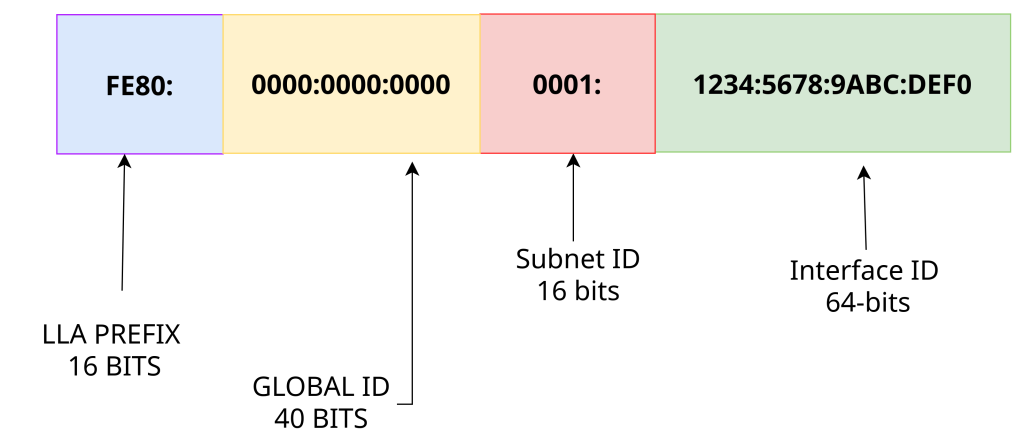
LLA- Link-local address is another private only address but has a much more limited scope. Link-local addresses are automatically created whenever IPv6 is enabled on an interface. It is automatically created by the OS of the router or host. It starts with the prefix of FE80::/10, whenever you see that prefix you know for certain it’s a LLA. Unlike ULA, this address is not routable on the private network at all, it is confined to the local link (network segment) only. The link local address is not routable at all meaning you will not be able to communicate even to different subnets on the same private network or traverse any routers. In order to talk to different subnets on the same private network, you will use either a ULA or GUA. You can find LLA in the source IPv6 in Router Solicitations and Advertisements.
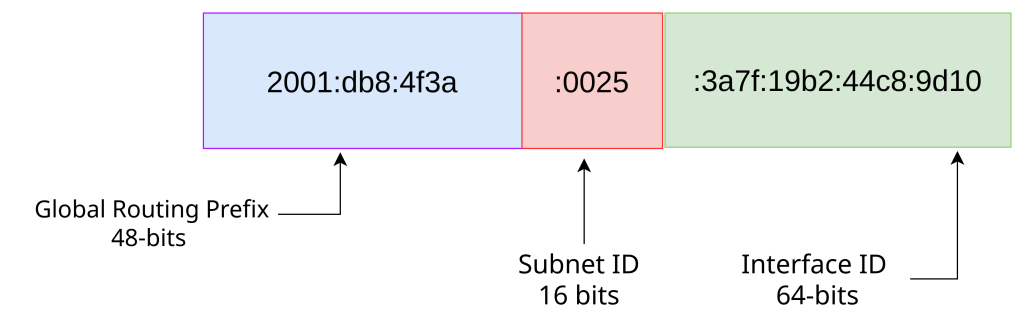
GUA- GUA is the public address, basically functions the same as a regular IPv4 public address. This address is routable on the public internet but also routable on the private network as well. Every GUA starts with the prefix of 2000::/3, so if you ever see that you know for certain that it’s a public address. These addresses have no need to be translated or preserved as there are sufficient addresses, NAT is possible for IPv6 but rarely used . A GUA can be assigned via SLAAC, manually or DHCPv6.
Leave a Reply